function FlattenQSpline(const pts: TPathD): TPathD;
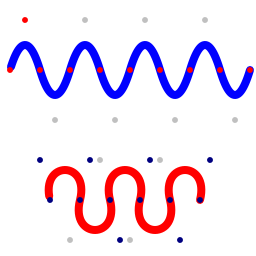
This function converts QSpline points into a flattened path. It loosely approximates the 'T' command inside the 'd' property of an SVG path. In essence, a QSpline 'pts' array represents a series of points that define a series of joined quadratic bezier curves.
The first three coordinates of the spline represent the starting point, control point, and end point of the first sub-curve (just like a quadratic bezier curve). Subsequent points represent the end points for following sub-curves. Control points for following sub-curves are derived from the very first control point; with each new control point being the control point of the preceding sub-curve reflected across its end point.
uses
  Img32, Img32.Fmt.PNG,
    Img32.Vector, Img32.Draw;
...
var
  img: TImage32;
  path: TPathD;
  pts: TPathD;
  ghostPt: TPointD;
begin
  img := TImage32.Create(256,256);

  //create and draw a BLUE QSpine path
  pts := MakePathI([10,70, 25,20,
    40,70, 70,70, 100,70, 130,70, 160,70,
    190,70, 220,70, 250,70]);
  path := FlattenQSpline(pts);
  DrawLine(img, path, 8, clBlue32, esRound);

  //show where the 'pts' are too
  for i := 0 to high(pts) do
    DrawPoint(img, pts[i], 3, clRed32);

  //and show the derived control points
  ghostPt := pts[1];
  for i := 2 to high(pts) do
  begin
    ghostPt := ReflectPoint(ghostPt, pts[i]);
    DrawPoint(img, ghostPt, 3, clSilver32);
  end;

  //CODE FOR (RED) CSPLINE OMITTED

  img.SaveToFile('splines.png');
  img.Free;
end;
In the image below the blue curve is a QSpine. The red dots indicate the user defined control and end points, and the pale gray dots indicate virtual control points (ie derived from preceding control points).
FlattenCSpline, FlattenQBezier
Copyright ©2010-2023 Angus Johnson - Image32 4.8 - Help file built on 16 Apr 2025