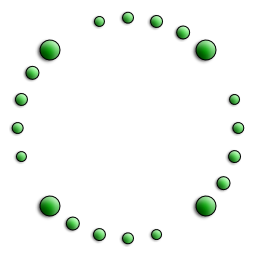
procedure MatrixRotate(var matrix: TMatrixD; const center: TPointD; angRad: double);
Adds a rotation to the supplied matrix.
nb: The direction of rotation will depend on the ClockwiseRotationIsAnglePositive variable.
uses Img32, Img32.Fmt.PNG, Img32.Vector;
...
var
  img: TImage32;
  m: TMatrixD;
begin
  img := TImage32.Create;
  img.SetSize(256,256);

  //draw buttons at the corners of a square inset 50px from the image's edges.
  pts := Rectangle(50, 50, 206, 206);
  for i := 0 to high(pts) do
    DrawButton(img, pts[i], DpiAware(20), $FF00AA00, [boDropShadow]);

  //create a matrix that rotates 15 degrees about the point [128,128] and
  //draw shrinking buttons while rotating these a total of 4 * 15 degrees
  m := IdentityMatrix;
  MatrixRotate(m, PointD(128,128), angle15);
  for i := 1 to 4 do
  begin
    MatrixApply(m, pts);
    for j := 0 to high(pts) do
      DrawButton(img, pts[j], DpiAware(14 - i), $CC00CC00, [boDropShadow]);
  end;

  img.SaveToFile('Rotate4Buttons.png');
  img.Free;
end;
Copyright ©2010-2023 Angus Johnson - Image32 4.8 - Help file built on 16 Apr 2025