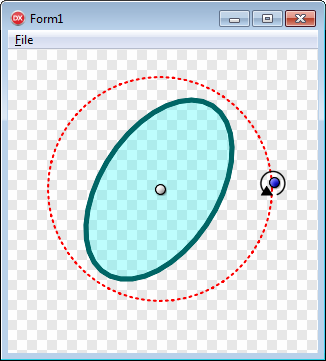
A TRotatingGroupLayer32 is designed to assist rotating layer objects and is returned by calling the CreateRotatingButtonGroup function.
The TRotatingGroupLayer32 contains 2 button layers - a pivot button, and an angle control button. Typically, the position of the angle control button is managed in a MouseMove event, and its new angle (relative to the pivot button) is returned by calling UpdateRotatingButtonGroup.
| Methods | Properties |
|---|---|
| In TRotatingGroupLayer32: | |
| Angle | |
| AngleButton | |
| CursorId | |
| DistBetweenButtons | |
| PivotButton | |
| PivotPoint | |
| In TGroupLayer32: | |
| FirstChild | |
| LastChild | |
| In TLayer32: | |
| AddChild | BlendFunc |
| BringForwardOne | Child |
| BringToFront | ChildCount |
| ClearChildren | ClipPath |
| Create | Height |
| DeleteChild | Image |
| Destroy | Index |
| InsertChild | InnerBounds |
| Invalidate | InnerRect |
| MakeAbsolute | Left |
| MakeRelative | Location |
| Offset | MidPoint |
| PositionAt | Name |
| PositionCenteredAt | Opacity |
| SendBackOne | OuterBounds |
| SendToBack | Parent |
| SetInnerBounds | Root |
| SetSize | RootOwner |
| Top | |
| UserData | |
| Visible | |
| Width | |
CreateRotatingButtonGroup, UpdateRotatingButtonGroup
Copyright ©2010-2023 Angus Johnson - Image32 4.8 - Help file built on 16 Apr 2025