
procedure Draw3D(img: TImage32; const polygon: TPathD; fillRule: TFillRule; height, blurRadius: double; colorLt: TColor32 = $DDFFFFFF; colorDk: TColor32 = $80000000; angleRads: double = angle135); overload;
procedure Draw3D(img: TImage32; const polygons: TPathsD; fillRule: TFillRule; height, blurRadius: double; colorLt: TColor32 = $DDFFFFFF; colorDk: TColor32 = $80000000; angleRads: double = angle135); overload;
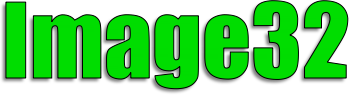
Creates a 3D effect over polygons using light and dark shading. The amount of shading is determined by the height and blurRadius parameters. The colors of the light and dark shading and the shading angle can all be customized, as can the light-to-dark angle. angleRads indicates the angle of the light shading relative to the image's center.
uses Img32, Img32.Fmt.PNG, Img32.Text,
  Img32.Vector, Img32.Draw, Img32.Extra;

  ...
  var
    img: TImage32;
    textOutline: TPathsD;
    impactFont: TFontReader;
    impact96: TFontCache;
  begin
    img := TImage32.Create(400,150);
    // Instruct the font manager to load
    // the Windows' Impact TTF font
    FontManager.Load('Impact', 800);
    // and then get the TFontReader for this font
    impactFont := FontManager.GetFont('Impact');
    // create character outlines using font size 96
    impact96 := TFontCache.Create(impactFont, DpiAware(96));
    try
      textOutline :=
        impact96.GetTextOutline(20, 130, 'Image32');
      //draw textOutline using shadow & 3D effects
      DrawShadow(img, textOutline, frNonZero, 3);
      DrawPolygon(img, textOutline, frNonZero, $FF00DD00);
      Draw3D(img, textOutline, frNonZero, 3,4);
      DrawLine(img, textOutline, 1, clBlack32, esPolygon);
      img.SaveToFile('c:\temp\Image32.png');
    finally
      img.Free;
      impact96.Free;
    end;
  end;

Copyright ©2010-2023 Angus Johnson - Image32 4.8 - Help file built on 16 Apr 2025